Showing posts with label lifehack. Show all posts
Showing posts with label lifehack. Show all posts
Sunday, June 10, 2007
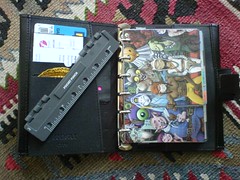
Yesterday went in to the Arndale centre to find some bits and pieces. I had a quick check of the filofax section in Smith's but didn't really see anything I want (I'm looking for quadrille paper, a world map, printer paper and some other stuff but shops never have it for pocket size, only the larger sizes). Then I found the hole punch. That was pretty much top of the list because with it I can create my own pages and really start to customise and prettify what can otherwise be an overly drab and practical object. The photo shows the punch and a page I create from a flyer for Journey to the West opera that is coming up in July. Much better to see that rather than gun-metal grey.


Sunday, December 03, 2006

Every so often I will think about taking another look at Linux. Usually the pattern is that I install it, play with it, and then uninstall it after a week when I need a Windows application or realise that, actually, Linux is kind of ugly and not that nice, or get fed up of having a simple task like sticking a CD into the drive made complicated. It has been a few years since I last tried it and I have been seeing frequent references to a new, easy to use distribution called Ubuntu. This itself still was not really enough to convince me but then I read that Mac users were making the switch. Maybe Linux is finally ready to be a desktop replacement that you can enjoy using instead of putting up with. I wanted to find out.
I downloaded the iso to burn it to a cd. You boot from the cd and the operating system starts so you have an opportunity to try it and see if it works before you commit yourself to installing. It seemed to work fine on my Acer 5500 laptop apart from a lack of correct screen resolutions and I liked the look of it. The default theme is orange which makes it really stand out from pretty much every other operating system out there. I admit I do like it but, if I get bored of it this is Linux and it is a simple job to changed pretty much every aspect of how it looks.
I lacked the courage to actually install it on my laptop as I was concerned about losing XP. Fortunately my work PC, which was pretty much not working due to the number of viruses on the school network, had a couple of very large, empty partitions and I decided to give it a go on that. After playing with it and using it for work pretty much full-time Nanowrimo came along and I needed to use the rather rubbish computer the school provided for my apartment. Because of the difficulty it has with XP I decided to give Ubuntu a try on that too. For the whole month of November, then, I have been almost exclusively using Ubuntu and for the first time I did not miss Windows at all. I decided to take the plunge and install it on my laptop.
All three installations have gone without any major problems. There is some great online documentation for helping fix up some of the little issues with Ubuntu hot off the cd and tools like Easy Ubuntu made the work of getting MP3 working, installing Skype and getting the correct video drivers very easy. I also decided to give Beryl a try. Beryl is a kind of extra layer for the UI which makes windows transparent, or wobble when you move them, and generally look like a very modern, Vista-like operating system. It can be a bit flaky and crash (it is still in development) at times but it does look really good, once some of the more extreme effects have been turned off.
I've also found applications to match everything I need and want to do with my laptop. Amarok is an excellent music player with some really good features, like lyric look-up and a feature that downloads all the missing album covers for you. Picasa is available for Linux too so I get to keep my favourite photo organiser. Stellarium is a really good-looking star map program and Democracy TV looks really interesting, offering easy downloads from various channels, You Tube search and download and the ability to add torrents. Open Office and Abiword are decent replacements for Microsoft Office, although they are not quite as good (and I miss the ribbon) but they do everything that I need them to do. I spend most of my time in Google Docs now anyway - pretty much all of my novel was written in it. The only thing I can't do is play the latest games, but I got out of the habit of doing that a long time ago.
So, is it all it's cracked up to be, a Linux for the masses? Well, not quite. It is very usable once it has been set up. Installing applications is easy, and free, but some things do still require a trip to the console to run commands. There's no mp3 support on a fresh install and, although it's easy to sort things like this out using Easy Ubuntu or a guide it is an extra burden. I would say, though, that once it is all set up then it is easy to use (And, to be honest, how many people can really set up Windows themselves, easily, getting it all right? At least with Ubuntu you also end up with all the software the average user needs already installed. Except for mp3.) I will keep using it and now feel I have pretty much made the switch. Of course I'll still need to use MS Windows for development and the odd thing that I can't do with Linux (update my horribly proprietary Sony mp3 player or play Rome:Total War) but I feel comfortable with Ubuntu now and plan on sticking with it for a while. Hasta la victoria siempre.
Links:
http://www.ubuntu.com/ubuntu
http://ubuntuguide.org/wiki/Ubuntu_Edgy
http://diveintomark.org/archives/2006/06/26/essentials-2006
Sunday, August 13, 2006
Well, I survived the typhoon. Actually we didn't even get any rain here in Ningbo although it was pretty bad in the south of the province. This week I've decided to finish with my part-time work with Web English School as it was just taking up too much of my time. My new job as Dean is really starting to take off and I want to be able to focus on that, and write, and the money isn't so important. It paid for my phone and got me a little extra, so that's ok.
As a writer I like to collect news articles, bits of science and odd words that I uncover on the internet. Previously this meant adding links to your favourites (and, latterly, delicious and bloglines) and forgetting about them. Then, almost inevitably, when you came back to read the article it wold be gone, moved or deleted, meaning extra wasted time searching Google for some remains of a half-remembered idea. Scrapbook for Firefox is a plugin that allows you to select a piece of text or even a whole web page and save it to your hard drive. It also has the ability to categorize your snippets into folders, add notes of your own, search and highlight text. All very useful, until you move to China and leave your computer behind.
Recently Google announced Notebook, an application that does pretty much the same as scrapbook but with the advantage that all your information is stored at Google, can be shared with others, and accessed anywhere with the internet. It also integrates with Firefox so additions can be made quickly simply by right-clicking on a selected piece of text or page, just like Scrapbook...
I've been using it a lot to collect articles and research information but I feel I haven't been using it all that effectively. Sure, it's a repository of information I want to be able to read when I want but what else can it do? This week I started using the enhanced Google homepage again and rediscovered the wonderful Word of the Day. I decided to add a word from the list to the Google notebook and realised that I may be able to use it more effectively. This morning I went into it and set up four different notebooks: Inbox, Words, Inspiration and Novel. Inbox is the default. Everything added goes in there. This saves me having to continuously alter which Notebook I'm adding to which is not an easy or intuitive process, especially from the pop-up window. Now, once a week I can go through the Inbox and file things into the correct notebook. Interesting articles that may be a starting point for an idea in Inspiration, words I like into Words, and research for my novel, well, you get the idea. Each notebook can also be divided into sections, which can be useful fo separating out specific information further. So now I can spend even more time on the web "researching" ;)
Google Notebook is still a labs (beta) product and does have some flaws and some omissions. There is AJAX implementation to create a nice interface but it can be a little unwieldy at times. Options such as collapse all are only available through a drop-down menu and they should really have instant access icons. You can create sections within a notebook but notes added just seem to be thrown into the latest section instead of at the top where they can be filed easily or, ideally, asking you which section you want the note in when you drop it onto the notebook. There is also no "tagging," a concept so integral to Gmail which would also work really well here as it is impossible to have notes in more than one section. The option to be able to quickly highlight text would also be useful as would being able to view the note full page or as a pop-out.
As a writer I like to collect news articles, bits of science and odd words that I uncover on the internet. Previously this meant adding links to your favourites (and, latterly, delicious and bloglines) and forgetting about them. Then, almost inevitably, when you came back to read the article it wold be gone, moved or deleted, meaning extra wasted time searching Google for some remains of a half-remembered idea. Scrapbook for Firefox is a plugin that allows you to select a piece of text or even a whole web page and save it to your hard drive. It also has the ability to categorize your snippets into folders, add notes of your own, search and highlight text. All very useful, until you move to China and leave your computer behind.
Recently Google announced Notebook, an application that does pretty much the same as scrapbook but with the advantage that all your information is stored at Google, can be shared with others, and accessed anywhere with the internet. It also integrates with Firefox so additions can be made quickly simply by right-clicking on a selected piece of text or page, just like Scrapbook...
I've been using it a lot to collect articles and research information but I feel I haven't been using it all that effectively. Sure, it's a repository of information I want to be able to read when I want but what else can it do? This week I started using the enhanced Google homepage again and rediscovered the wonderful Word of the Day. I decided to add a word from the list to the Google notebook and realised that I may be able to use it more effectively. This morning I went into it and set up four different notebooks: Inbox, Words, Inspiration and Novel. Inbox is the default. Everything added goes in there. This saves me having to continuously alter which Notebook I'm adding to which is not an easy or intuitive process, especially from the pop-up window. Now, once a week I can go through the Inbox and file things into the correct notebook. Interesting articles that may be a starting point for an idea in Inspiration, words I like into Words, and research for my novel, well, you get the idea. Each notebook can also be divided into sections, which can be useful fo separating out specific information further. So now I can spend even more time on the web "researching" ;)
Google Notebook is still a labs (beta) product and does have some flaws and some omissions. There is AJAX implementation to create a nice interface but it can be a little unwieldy at times. Options such as collapse all are only available through a drop-down menu and they should really have instant access icons. You can create sections within a notebook but notes added just seem to be thrown into the latest section instead of at the top where they can be filed easily or, ideally, asking you which section you want the note in when you drop it onto the notebook. There is also no "tagging," a concept so integral to Gmail which would also work really well here as it is impossible to have notes in more than one section. The option to be able to quickly highlight text would also be useful as would being able to view the note full page or as a pop-out.
Thursday, January 19, 2006
With my imminent departure to China I have been thinking about my analogue/paper system (inspired by random reading on D*I*Y Planner). I think I have three major requirements for data capture in my daily life:
But there are problems with it. Basically it eats cards so fast, which feels a bit wasteful but also means that I'm constantly running out so I end up sub-consciously rationing them and not capturing everything I want. Also the temporary nature of the system means that it's not so useful for contact information (which I generally keep in my phone or digital anyway) or other reference stuff. But the main gap is that I can't get a calendar working with it and this causes me problems. I've tried D*I*Y calendars, PocketMod, creating my own week planner on an index card and, while they've all worked for a time they've either ended up getting lost, or scrappy/ugly or required too much effort to create.
I'm considering a file-o-fax as that might give me some of the flexibility of the hipster with the clean-ness of the printed page but I think that it will be too clunky. At the moment the best bet is to stick with what I've got but:
- Next Action lists
- Random thought/ideas capture (and working on those ideas)
- Organising appointments and dates
But there are problems with it. Basically it eats cards so fast, which feels a bit wasteful but also means that I'm constantly running out so I end up sub-consciously rationing them and not capturing everything I want. Also the temporary nature of the system means that it's not so useful for contact information (which I generally keep in my phone or digital anyway) or other reference stuff. But the main gap is that I can't get a calendar working with it and this causes me problems. I've tried D*I*Y calendars, PocketMod, creating my own week planner on an index card and, while they've all worked for a time they've either ended up getting lost, or scrappy/ugly or required too much effort to create.
I'm considering a file-o-fax as that might give me some of the flexibility of the hipster with the clean-ness of the printed page but I think that it will be too clunky. At the moment the best bet is to stick with what I've got but:
- Buy lots of index cards at a time - ideally about five packs.
- Buy a small A6 diary for appointments which will barely increase the carry size of the whole package but give me the calendar I really need.
Wednesday, December 14, 2005
Well, I've joined a cult, well, kind of. I've been using GTD to help organise my life and my thinking for nearly six months now and I am amazed that it has lasted so long. More than that it doesn't seem a question of "using" anymore, more that's the way I do things. Basically, for me, it works and works well to complement the way I already organised myself.
Of course the system is under constant review and testing. Sites like 43folders offer ongoing ideas to add in and try. Some of the things I've done that I like are:
* Organising my Lotus Notes into GTD type categories and adding icons to quickly file mails into them. Notes isn't exactly the friendliest of email tools and it's hard to change much but the system works well for forcing me to deal with the massive amounts of mail I get at work and make sure that nothing slips by. Basically emails get read and then either deleted, replied to, archived or put into a Next Actions folder. I do have a waiting folder and a someday/maybe folder but they don't get used so much.
* Sharepoint site for my team. I have set up a to-do list for myself which I use to complement the email list. Everything work related should be in one or the other.
* Gmail. It shouldn't be as good as it is but it is. Emails are treated the same as at work. I've also set up filters to detect +... after my address so that I can use it as a kind of todo list for home as well as archiving writing, etc. I've also created entries in my address book for these filters so I just type in "todo" into the address bar to automatically save and file emails when using the Gmail to record stuff.
* Del.icio.us. Part of a general shift to keeping more stuff online. I use a "star" label to mark things out as something I want to look at later and added the feed for that tag into my rss reader. Or I could live bookmark it in Firefox.
Am still having a few problems integrating it into home life. It works well but I tend to find I'm not as focused outside the office. And I still haven't finished the book. It's good, but who has the time to read books on time management?
Of course the system is under constant review and testing. Sites like 43folders offer ongoing ideas to add in and try. Some of the things I've done that I like are:
* Organising my Lotus Notes into GTD type categories and adding icons to quickly file mails into them. Notes isn't exactly the friendliest of email tools and it's hard to change much but the system works well for forcing me to deal with the massive amounts of mail I get at work and make sure that nothing slips by. Basically emails get read and then either deleted, replied to, archived or put into a Next Actions folder. I do have a waiting folder and a someday/maybe folder but they don't get used so much.
* Sharepoint site for my team. I have set up a to-do list for myself which I use to complement the email list. Everything work related should be in one or the other.
* Gmail. It shouldn't be as good as it is but it is. Emails are treated the same as at work. I've also set up filters to detect +... after my address so that I can use it as a kind of todo list for home as well as archiving writing, etc. I've also created entries in my address book for these filters so I just type in "todo" into the address bar to automatically save and file emails when using the Gmail to record stuff.
* Del.icio.us. Part of a general shift to keeping more stuff online. I use a "star" label to mark things out as something I want to look at later and added the feed for that tag into my rss reader. Or I could live bookmark it in Firefox.
Am still having a few problems integrating it into home life. It works well but I tend to find I'm not as focused outside the office. And I still haven't finished the book. It's good, but who has the time to read books on time management?
Subscribe to:
Posts (Atom)

